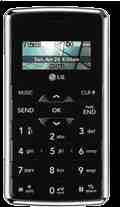
Alright, so I don't know if these are considered a "shortcut" I just found them convenient. When the env2 is open press a number and then press a letter to bring up numbers. Basically if you've memorized the regular keypad you can use the letters on the qwerty keyboard inside as numbers.
A=2
B=2
C=2
D=3
E=3
F=3
G=4
H=4
I=4
J=5
K=5
L=5
M=6
N=6
O=6
P=7
Q=7
R=7
S=7
T=8
U=8
V=8
W=9
X=9
Y=9
Z=9
More Tips...
- To activate silent mode fast, hold down the "lower volume" button on the side. and hold the "higher volume" button to change it back to normal mode.
- To access your email faster without paying for the mobile email application or having to go through the browser.
Go to the main menu and click the email then the second icon.
or go to "messaging" then "7" and the second icon. - For a faster text message or note using the qwerty keyboard:
Press the right directional arrow, then settings.
Then "Set Qwerty shortcut" and select text message or note. - If you think that the env2 takes to long to lock it's front screen, press and hold "0" on the front screen and it will lock. Or just open the phone and then close it.
- To activate vibrate mode from the internal screen press and hold "z" and press and hold again. To have a text message read to you on the internal screen, press the space bar.
and I think that pretty much sums it up. most of them you probably already know, but I thought I'd try anyways.:)